Der Warenkorb ist leer

Secure Environments / High-Security Applications

🔒 ITVDesk for High-Security Environments

ITVDesk is now designed to meet the needs of organizations where data privacy, encryption, and network security are mission-critical. With full support for RTSPS, SRTP, HTTPS, and ONVIF Security Services, ITVDesk provides a secure foundation for real-time video and audio streaming — ideal for enterprise networks, government institutions, financial systems, defense, and healthcare environments.

Key Security Technologies

  • RTSPS (RTSP over TLS) — Encrypts all RTSP video and control traffic, ensuring no credentials or stream data are exposed.
  • SRTP (Secure Real-time Transport Protocol) — Protects audio and video media at the transport layer using AES encryption.
  • HTTPS Web Interface — All device communication and configuration are secured with trusted TLS certificates.
  • ONVIF Security Service — Full compliance with ONVIF Profile T and Security specifications for authenticated device control.
  • Encrypted Local Storage — All configuration files, passwords, and stream data are stored locally with AES-based encryption.

Where Security Matters Most

ITVDesk is built for industries that require the highest levels of reliability and protection:

  • 🏢 Enterprise & Corporate Networks — Encrypted internal video feeds and access control integration.
  • 🏛️ Government & Defense — Compliance with secure streaming protocols and authentication layers.
  • 🏥 Healthcare & Research Facilities — Protection of sensitive video data under strict privacy requirements.
  • 🏦 Financial Institutions — Secure internal monitoring of ATMs, branches, and critical infrastructure.
  • 🏭 Industrial & Energy Sector — Trusted for encrypted real-time monitoring of production and control systems.

Future-Ready Secure Architecture

With built-in support for IPv6 and advanced encryption standards, ITVDesk is ready for the next generation of networked security systems. Whether used locally or over enterprise VPNs, every connection — from device discovery to live stream — is protected end-to-end.

ITVDesk v8.6 — Secure. Reliable. Enterprise-grade.

People Counting with ITVDesk AI-Powered Software

ITVDesk Object Counting with Our AI-Powered Software

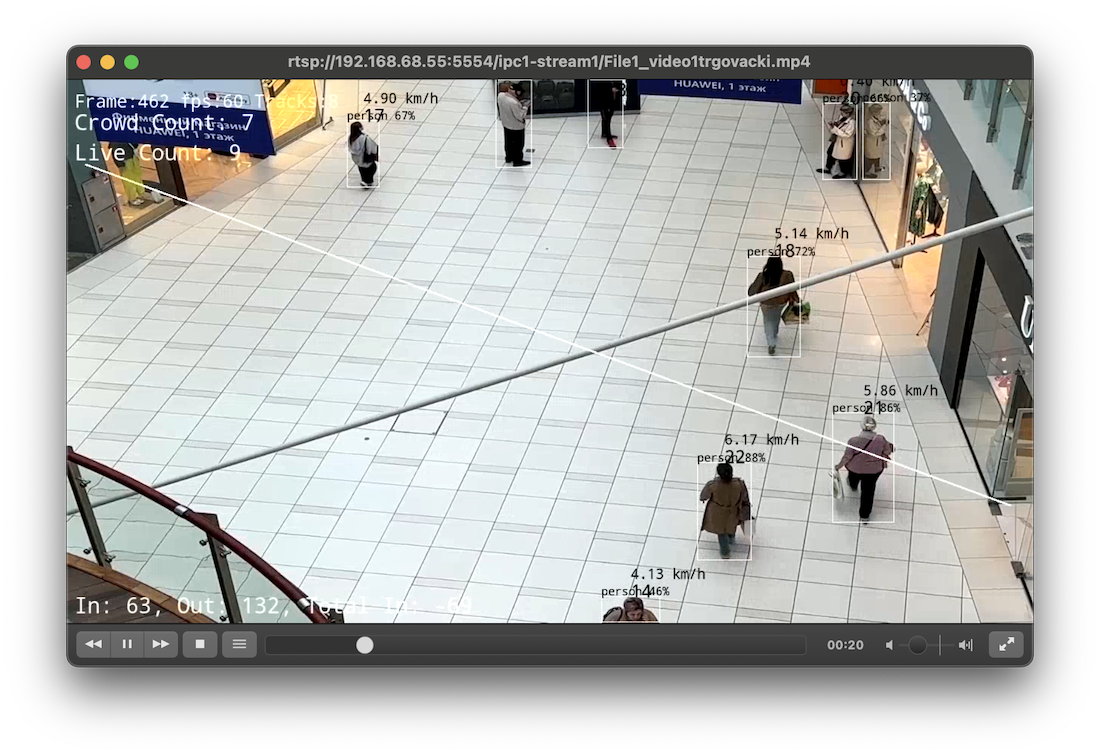
In the world of modern video surveillance, the ability to accurately and anonymously count objects is invaluable. Our software, leveraging artificial intelligence technology, seamlessly integrates with existing CCTV cameras to provide this functionality with over 98% accuracy (depending on camera positioning and angle of view). Here’s how it works and where it’s used.
person countingHow It Works

Camera Integration:
- Use overhead CCTV or IP cameras to track objects and people's movements.
- Connect your camera to our ITVDesk software, which processes the video feed to detect entries, exits, queues, and waiting times.

Detection and Analysis:
- Our software precisely identifies and counts various objects as they move through the monitored area. Supported objects include:
- **People**
- **Vehicles**: car, bicycle, motorcycle, bus, train, truck, boat, airplane
- **Animals**: cat, dog, bird, horse, sheep, cow, elephant, bear, zebra, giraffe
- **Items**: handbag, suitcase, sports ball, bottle, wine glass, cup, knife, bowl, banana, apple, orange, book, broccoli, carrot, pizza, cake
- It provides key performance indicators (KPIs) such as sales conversion rates, dwell times, crowd density, movement speed, and staff-to-visitor ratios.

Data Transmission:
- The processed data is securely transmitted and can be accessed via web browsers.
- Various communication methods are supported, including the Internet of Things (IoT), Wi-Fi, LAN, or via the ONVIF protocol.

Applications

Retail Stores:
- Track customer entry and exit points to understand peak hours and improve staff allocation.
- Analyze dwell times and sales conversion rates to optimize store layouts and marketing strategies.

Public Transportation Hubs:
- Monitor passenger flow to enhance service scheduling and reduce congestion.
- Provide passengers with real-time occupancy levels via apps, improving their travel experience.

Event Venues:
- Manage crowd control by monitoring queue lengths and waiting times.
- Ensure compliance with safety regulations by tracking occupancy levels.

Offices:
- Optimize space utilization by understanding how different areas are used throughout the day.
- Improve visitor management by tracking and analyzing visitor patterns.

Urban and Traffic Management:
- Monitor and manage traffic flow by tracking vehicles and optimizing traffic light timings.
- Ensure safety by identifying and responding to potential hazards on the roads.

Benefits

Accuracy and Anonymity:
- Achieve over 98% accuracy in object counting while ensuring anonymity, protecting individuals' privacy (depending on camera positioning and angle of view).

Real-Time Insights:
- Access real-time data to make informed decisions and improve operational efficiency.

Enhanced Customer Experience:
- Use insights from dwell times and queue statistics to reduce wait times and improve customer satisfaction.

By using our AI-powered software, businesses and organizations can gain valuable insights into object and foot traffic and optimize their operations for better efficiency and customer service. This innovative solution transforms existing surveillance infrastructure into a powerful tool for data-driven decision-making.
ITVDesk for Education | Monitor Student Screens & Exams in VMS

ITVDesk for Education & Academic Monitoring

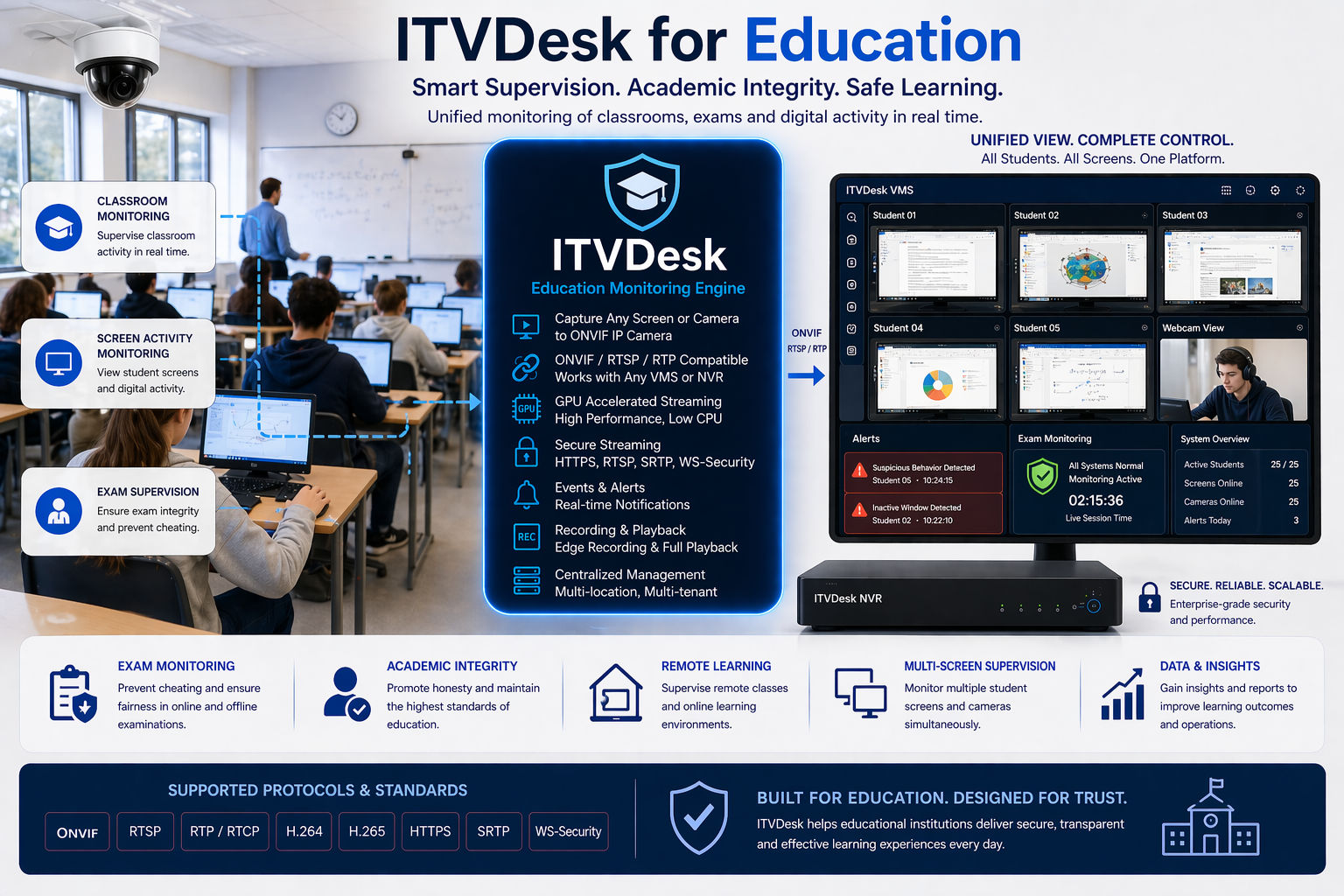
Educational institutions require reliable monitoring of classrooms, computer labs, and exam environments. While traditional surveillance systems provide visibility into physical spaces, student activity and academic processes take place on computers, applications, and digital platforms.

ITVDesk extends surveillance into these digital environments by integrating screens, webcams, and applications directly into existing video management systems.

Educational Environment Reality

Modern education increasingly relies on digital tools, online platforms, and computer-based testing. Students use computers during exams, lectures, and research, making digital monitoring just as important as physical supervision.

Standard CCTV systems cannot capture what happens on student screens, creating a gap in supervision during critical activities such as exams or remote learning sessions.

Institutions require a complete view of both physical and digital activity to ensure fairness, integrity, and security.

Key Challenges

  • No visibility into student screen activity during exams
  • Difficulty detecting cheating or unauthorized actions
  • Limited supervision of computer labs and libraries
  • Lack of synchronization between camera footage and digital activity
  • Challenges in monitoring remote or hybrid learning environments

ITVDesk Approach

ITVDesk transforms student and teacher workstations into ONVIF-compatible video streams, enabling seamless integration into existing surveillance systems.

  • Stream student screens, webcams, and applications into VMS
  • Combine multiple sources into a single monitoring view
  • Record digital activity alongside classroom video footage
  • Enable centralized supervision across multiple classrooms and locations
  • Support both on-site and remote learning environments

This provides educators and administrators with a complete overview of academic activity in real time.

Typical Education Use Cases

  • Exam Monitoring – supervise student screens and behavior during tests
  • Computer Lab Oversight – monitor usage of school computers and applications
  • Lecture Monitoring – combine classroom video with digital content
  • Library Supervision – track activity on shared workstations
  • Remote Learning Monitoring – supervise students in distributed environments
  • Academic Integrity Control – detect unauthorized software or actions

Key Capabilities

  • ONVIF-compliant virtual camera integration
  • Real-time streaming of screens and webcams
  • Multi-source monitoring (screen + camera + audio)
  • Combined channel view for complete supervision
  • Secure communication (HTTPS, SRTP, authentication)
  • Full compatibility with VMS/NVR platforms

Operational Benefits

  • Improved exam integrity and fairness
  • Full visibility into student activity
  • Enhanced control of computer labs and shared resources
  • Centralized monitoring across multiple classrooms
  • No additional hardware required for deployment

Monitor Student Activity with Full Visibility

Integrate screens, webcams, and digital learning environments into your surveillance system.

Software-only solution. Fully ONVIF compatible. Ideal for modern education environments.

ITVDesk Streaming Infrastructure | RTSP Server & Video Distribution Platform

Streaming Infrastructure & RTSP Distribution

Organizations require reliable and scalable streaming infrastructure to distribute video and audio content across networks, systems, and locations. Traditional streaming setups often involve multiple tools, complex configurations, and limited integration with surveillance platforms.

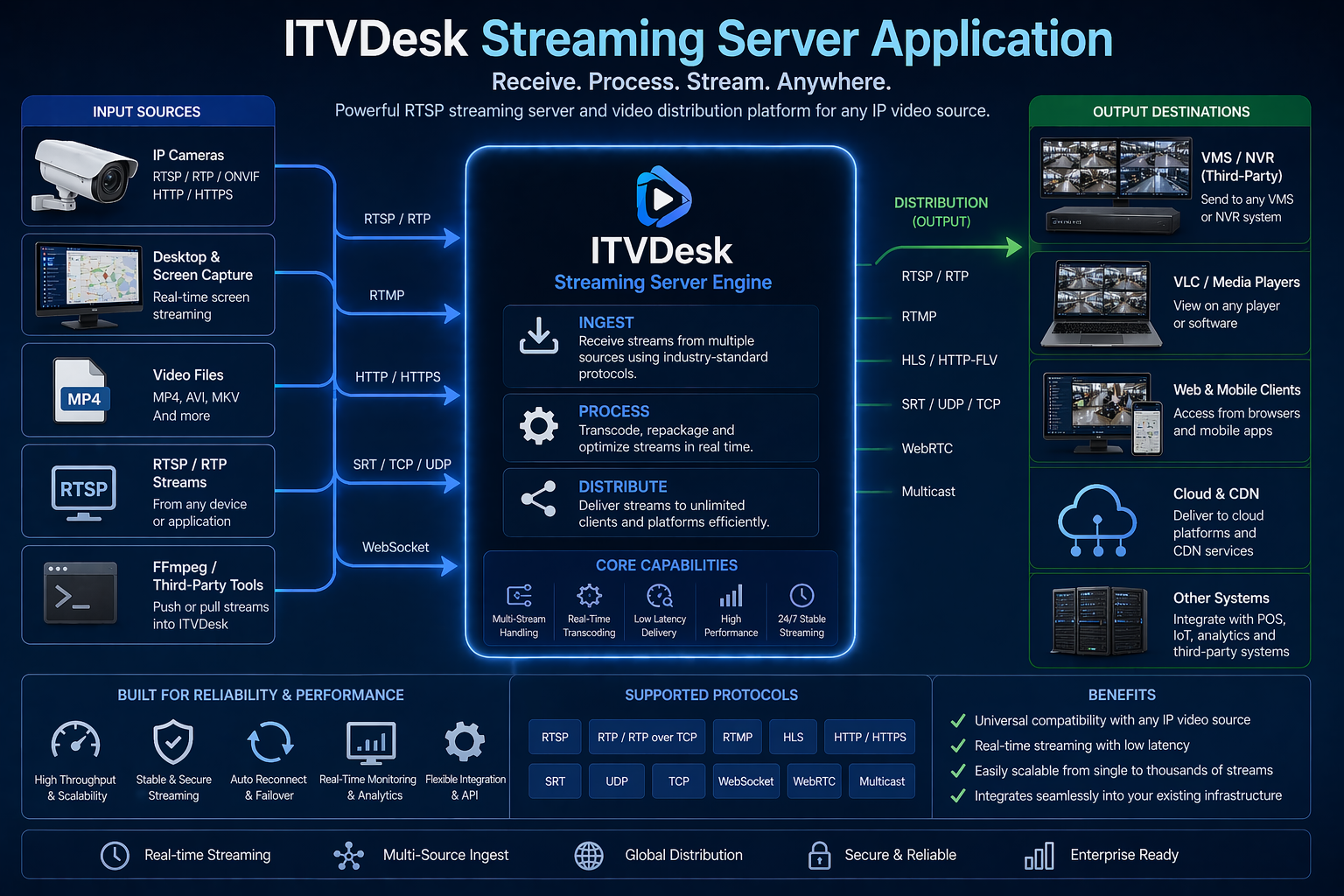
ITVDesk provides a unified streaming platform that enables real-time distribution of video and audio sources directly into VMS, NVR, and network clients using standard protocols.

The Challenge

Modern environments require streaming from multiple sources such as IP cameras, desktops, applications, and media content. Managing these streams across different systems can be complex, especially when compatibility, scalability, and performance are critical.

Organizations often rely on separate tools for encoding, streaming, and distribution, which increases complexity and reduces operational efficiency.

Key Challenges

  • Managing multiple video and audio sources across systems
  • Ensuring compatibility between different streaming protocols and devices
  • Scaling streaming infrastructure for multiple clients and locations
  • Maintaining low latency and stable performance
  • Integrating streaming with existing VMS and surveillance platforms

ITVDesk Approach

ITVDesk acts as a flexible streaming infrastructure platform, enabling ingestion, processing, and distribution of video and audio streams using standard protocols such as RTSP, RTP, and HTTP.

  • Stream desktops, applications, cameras, and media files in real time
  • Distribute streams to VMS, NVR systems, and external clients
  • Support multi-stream output (main, sub, custom streams)
  • Enable RTSP push and pull integration with external systems
  • Combine multiple sources into a single output stream

This provides a unified streaming layer that simplifies content distribution across the entire infrastructure.

Typical Use Cases

  • Video Distribution – stream content to multiple clients and systems
  • VMS Integration – feed custom video sources into surveillance platforms
  • Live Event Streaming – distribute real-time content across networks
  • Remote Monitoring – stream operational data and visuals to control centers
  • Content Aggregation – combine multiple sources into unified streams
  • Testing & Development – simulate video sources for system integration

Key Capabilities

  • RTSP / RTP / HTTP streaming support
  • Multi-format video (H.265, H.264, MJPEG, MP4)
  • Wide audio codec support (AAC, G.711, OPUS, G.726)
  • Transcoding and transmuxing capabilities
  • Flexible bitrate, resolution, and FPS control
  • Audio back channel (two-way communication)

Operational Benefits

  • Centralized streaming infrastructure within one platform
  • Reduced complexity and fewer external tools
  • Scalable distribution across multiple clients and locations
  • High compatibility with existing systems
  • No additional hardware required for streaming deployment

Build a Flexible Streaming Infrastructure

Stream, process, and distribute video and audio content across your network using a unified platform.

Software-only solution. Fully ONVIF compatible. Designed for scalable streaming environments.

ITVDesk for Casinos | Monitor Gaming Systems & Control Rooms in VMS

ITVDesk for Casino & Gaming Surveillance

Casino environments require the highest level of security, accuracy, and control. While traditional surveillance systems monitor gaming floors and customer activity, critical operations take place on gaming machines, POS terminals, and control room systems.

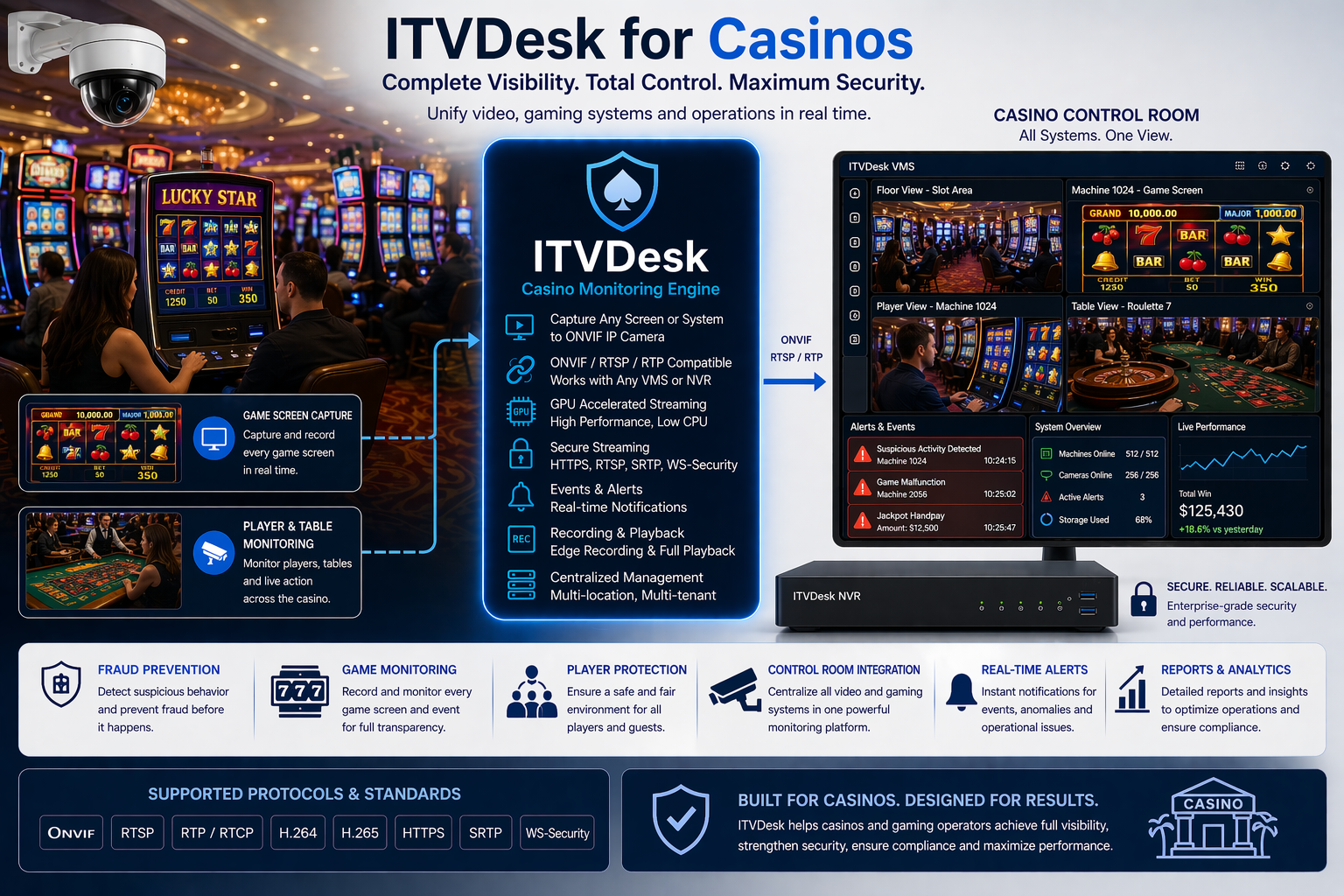
ITVDesk extends surveillance into these digital systems, enabling full visibility over gaming activity, operator actions, and control room decisions within a unified VMS environment.

Casino Operational Reality

Casinos operate under strict regulations and require continuous monitoring of gaming operations, financial transactions, and staff behavior. Gaming machines, betting systems, and surveillance control rooms rely on digital interfaces that are not visible through standard CCTV systems.

This creates a critical gap between physical surveillance and digital activity, especially during incidents involving fraud, disputes, or system manipulation.

To ensure full operational transparency, casinos need synchronized visibility across both physical and digital environments.

Key Challenges

  • No visibility into gaming machine screens and digital systems
  • Difficulty correlating CCTV footage with gaming activity
  • Limited insight into operator actions in control rooms
  • High risk of fraud, manipulation, or internal misuse
  • Complex investigation across multiple systems and locations

ITVDesk Approach

ITVDesk transforms gaming systems, POS terminals, and control room workstations into ONVIF-compatible video streams, allowing seamless integration into existing surveillance systems.

  • Stream gaming machine screens into VMS/NVR systems
  • Record operator actions and system interactions
  • Monitor control room activity in real time
  • Synchronize digital systems with CCTV footage
  • Enable centralized monitoring across the entire casino

This creates a complete surveillance environment where every action — both physical and digital — can be monitored and recorded.

Typical Casino Use Cases

  • Gaming Machine Monitoring – track activity on slot machines and digital systems
  • Control Room Supervision – monitor operator screens and decision-making processes
  • Fraud Detection – identify suspicious behavior and anomalies
  • Incident Investigation – review synchronized digital and video data
  • POS & Payment Monitoring – oversee transactions in bars, restaurants, and retail areas
  • High-Security Zone Monitoring – ensure full visibility in restricted areas

Key Capabilities

  • ONVIF-compliant virtual camera integration
  • Real-time streaming of gaming and control systems
  • Multi-channel monitoring across casino environments
  • PTZ desktop control for remote system interaction
  • Secure communication (HTTPS, SRTP, authentication)
  • Full compatibility with VMS/NVR platforms

Operational Benefits

  • Complete visibility across gaming operations and systems
  • Improved fraud detection and prevention
  • Enhanced accountability of operators and staff
  • Faster incident analysis with synchronized data
  • No additional hardware required for system integration

Achieve Full Visibility Across Casino Operations

Monitor gaming systems, control rooms, and transactions directly within your surveillance platform.

Software-only solution. Fully ONVIF compatible. Designed for high-security gaming environments.

Money-back policy


To ensure customer protection our company offers a 14 days money-back guarantee for our downloadable products.

Software products

If you are not satisfied with our products, you have the unconditional right to claim and receive a refund within 14 days after the purchase date. No refund is available after 14 days.

 
Custom development service

If you claim back your money before our developer starts working on the project the full amount will be reimbursed.
If you claim back your money after our developer has started working on the project, the returned funds are determined by the project manager depending on the progress of the project.

 
Procedure

A request for a refund must be submitted via our Contact Form.

Please notice that on receiving back your money you are obligated to remove the software and all related files from your web-server and every data medium; your further use of the software will be regarded as illegal unless you obtain a license again.

We also believe that most of the refunds can be avoided. Please contact our qualified staff and you will get professional assistance in any technical issue you have been faced with while installing/configuring the software. If you are not happy with our products or services for any reason, you are always welcome to send us your feedback and suggestions on how to improve the software or the services we offer. We will do the best we can to ensure you are totally satisfied with our software and customer service.


Möchten Sie ein ITVDesk-Partner werden?

a) Wir bieten Reseller-, OEM- und Technologiepartnerschaften.
Kontaktieren Sie uns unter Diese E-Mail-Adresse ist vor Spambots geschützt! Zur Anzeige muss JavaScript eingeschaltet sein!


b) Affiliate partner
icon affiliate 180
Wir bieten erstaunliche Computersoftware, Updates, Support, fügen neue Funktionen hinzu und kümmern uns um den Kunden.
SIE finden den Kunden und erhalten 25% des Verkaufserlöses !


How does it work?
We are using ITVDesk affiliate program feature to propose you this affiliation. Thanks to that, it'll take you less than 5 minutes to add your first affiliate link to your own website !
  • Step 1: create an account on our website (if you haven't already done so)
  • Step 2: Log in
  • Step 3: Click on the menu Your account -> Affiliate (this menu is only displayed if you're logged in)
    In this area, you'll be able to see your affiliate ID, enter your paypal e-mail address, see the orders corresponding to your affiliate ID, etc.
    That will definitely be your central place to see what's going on...
  • Step 4: Add a link to our website on your website including your affiliate ID (you'll find some examples in your affiliate area).
    example: https://www.itvdesk.eu?itvdesk_partner_id={your_affiliate_id}
    Replace "{your_affiliate_id}" with your own affiliate ID ! (the examples in your affiliate area already display the link with your own affiliate ID)
    example: https://www.itvdesk.eu?itvdesk_partner_id=24
  • Step 5: You don't have to do anything else, you're done! Just sit back and earn some extra income through our Affiliate program !
Our Affiliate program will detect each click generated by your affiliate ID and store a cookie in the visitor's computer.
If the visitor makes a purchase within 30 days of the first click, you'll get 25% of the sales revenue!
We keep track of the most recent clicks and you can see them on your own affiliate area (it's an easy way to make sure the link you added on your website is working properly).
 
How much will you get paid?
You will get 25% of the sales revenue for each of our products you manage to sell.
Except special agreements, orders purchased with a coupon code will not be attached to your affiliate account.
 
How will you get paid?
For the moment, we only pay our affiliates via PayPal.
If you cannot receive money using a PayPal account, please contact our team to find an alternative solution.
 
When will you get paid?
We ensure a 30-day money-back guarantee, so we cannot pay a sale before 30 days after the order was made.
We apply a minimum payment amount, which is €50 (50EUR) or $80 (80USD), so you have to accumulate orders until you reach the minimum.
You will be paid in the currency of your choosing and if some of sales are made in another currency your percentage on them will be converted to your currency.
You can use our contact form in order to request the payment of your commissions. If you meet the requirements written above, our team will then proceed to the payment to your PayPal email that you specified in your affiliate program page.
 
Example
John registered on itvdesk.eu
He added a link on his website: https://www.itvdesk.eu/index.php?itvdesk_partner_id=24 (John's affiliate ID is 24)
Mike is visiting John's website and clicks on this link.
On Mike's computer, our affiliate program added a cookie to keep John's affiliate ID for 30 days.
Mike downloads ITVDesk and leaves the website (John's affiliate ID is still in the cookies!).
10 days later, Mike comes back and goes directly onto itvdesk.eu and decides to buy a product which costs 100$.
John's affiliate ID is still in the cookies so 25$ is added to his affiliate account (which will be confirmed 30 days later if Mike does not request a refund).
...
Two months later, several visitors did the same thing and now John's affiliate account is 75$ so it's time for John to receive the money on his paypal account !
 
Terms & Conditions
By joining our Affiliate Program, you acknowledge that you have read, understood and agree with the terms and conditions.
itvdesk.eu reserves the right to add, delete and/or modify any of the terms and conditions in this Agreement, at any time and at its discretion alone, by posting a notice announcing a change or a new agreement on the itvdesk.eu website. If you do not wish to accept a particular amendment, you only reserve the right to terminate the agreement and your participation in the Affiliate Program. Your continued participation in the Affiliate Program following notice of a change or a new agreement on the itvdesk.eu website will automatically constitute acceptance of the changes.
 
Your obligations
You must use the Affiliate Program in a manner that demonstrates common sense and respect for the rights of itvdesk.eu and third parties.
You may not use our Affiliate Program on a website promoting sexually explicit material, violence, any kind of discrimination or illegal activities.
Any kind of advertisement causing damage to our name or products are prohibited.
Spam, unwanted commercial e-mails, posting in unappropriated newsgroups or forums (non-commercial for example) are also prohibited.
You may not advertise in any way that effectively conceals or misrepresents your identify, your domain name or your return e-mail address.
You may not use our affiliate program on any website url that contains all or part of our products' name, company name or web site name.
 
Termination
At its discretion alone, with or without notifying you, itvdesk.eu reserves the right to terminate this agreement and your participation in our affiliate program immediately, should you commit fraud in your use of our affiliate program or should you abuse this program in any way. If such fraud or abuse is detected, itvdesk.eu shall not be liable to you for any commission for such fraudulent sales.


Become an affiliate
Start NOW


Onvif-Funktionen

Liste der ITVDesk ONVIF-Kamerafunktionen implementieren
Security WS-Username Token  
Digest  
Discovery BYE Message  
Types tds:Device
dn:Network Video Transmitter
Device Service Capabilities GetCapabilities
GetService
Network Zero Configuration
NTP
Dynamic DNS
IP Filter
HTTPS
System System Logging
HTTP System Logging
HTTP Firmware Upgrade
HTTP Support Information
HTTP System Backup
Security Default Access Policy
Maximum Users
Remote User Handling
Maximum Username Length
Maximum Password Length
I/O Relay outputs
Event Service WS Basic Notification  
Message Content Filter ONVIF Message Content Filter Dialect
Get Service Capabilities MaxPullPoints capability
Pull-Point Notification  
Media Service Video JPEG
H.264
MPEG4
Audio G.711
G.726
AAC
Audio Output G.711
AAC
Real-time Streaming RTP/UDP
RTP/RTSP/HTTP/HTTPS
RTP/RTSP/TCP
RTP-Multicast/UDP
Snapshot URI  
Media2 Service Video H.265
H.264
Audio G.711
AAC
Audio outputs G.711
AAC
Real-time Streaming RTP/UDP
RTP/RTSP/HTTP
RTP/RTSP/TCP
RTP-Multicast/UDP
RTSP WebSocket  
Snapshot URI  
Video Source Mode  
OSD  
Analytics  
Metadata  
Media2 Events Media/ProfileChanged
Media/ConfigurationChanged
PTZ Service Absolute move Pan/Tilt movement
Zoom movement
Relative move Pan/Tilt movement
Zoom movement
Continuous move Pan/Tilt movement
Zoom movement
Presets  
Home position Configuration
Auxiliary operations  
Speed Speed for Pan/Tilt
Speed for Zoom
Move Status  
Status Position  
Get Compatible Configurations  
Device IO Service Relay outputs Bistable Mode
MonoStable Mode
Digital Inputs Digital Input Options
Imaging Service IrCutfilter Configuration  
Tampering Events Image Too Blurry
Image Too Dark
Image Too Bright
Global Scene Change
Motion Alarm  
Focus Control  
Analytics Service Rule Engine Rule Options
Motion Region Detector Rule
Analytics Modules Analytics Module Options
Recording Control Service Dynamic Recordings  
Dynamic Tracks  
Audio Recording  
Recording Options  
tns1:RecordingCofig/DeleteTrackData  
Metadata Recording  
Encoding JPEG
H264
MPEG4
Recording Search Service Metadata Search  
PTZ Position Search  
Replay Service RTP/RTSP/TCP  
Receiver Service    
Schedule Service    
Thermal Service    

ITVDesk ONVIF Camera Command supported List Implement

Module Commands supported
DeviceMgmt device_service[] =  
AddIPAddressFilter supported
AddScopes    supported
CreateCertificate unsupported
CreateDot1XConfiguration supported
CreateUsers supported
DeleteCertificates unsupported
DeleteDot1XConfiguration supported
DeleteUsers supported
GetAccessPolicy supported
GetCACertificates unsupported
GetCapabilities supported
GetCertificateInformation unsupported
GetCertificates supported
GetCertificatesStatus supported
GetClientCertificateMode unsupported
GetDeviceInformation supported
GetDiscoveryMode supported
GetDNS supported
GetDot11Capabilities supported
GetDot11Status supported
GetDot1XConfiguration supported
GetDot1XConfigurations supported
GetDPAddresses supported
GetDynamicDNS supported
GetEndpointReference unsupported
GetHostname supported
GetIPAddressFilter supported
GetNetworkDefaultGateway supported
GetNetworkInterfaces supported
GetNetworkProtocols supported
GetNTP supported
GetPkcs10Request unsupported
GetRelayOutputs supported
GetRemoteDiscoveryMode supported
GetRemoteUser supported
GetScopes supported
GetSystemBackup supported
GetSystemDateAndTime supported
GetSystemLog supported
GetSystemSupportInformation supported
GetSystemUris supported
GetUsers supported
GetWsdlUrl supported
GetZeroConfiguration supported
LoadCACertificates unsupported
LoadCertificates supported
LoadCertificateWithPrivateKey unsupported
RemoveIPAddressFilter supported
RemoveScopes supported
RestoreSystem supported
ScanAvailableDot11Networks unsupported
SendAuxiliaryCommand unsupported
SetAccessPolicy supported
SetCertificatesStatus unsupported
SetClientCertificateMode unsupported
SetDiscoveryMode supported
SetDNS supported
SetDot1XConfiguration supported
SetDPAddresses supported
SetDynamicDNS supported
SetHostname supported
SetIPAddressFilter supported
SetNetworkDefaultGateway supported
SetNetworkInterfaces supported
SetNetworkProtocols supported
SetNTP supported
SetRelayOutputSettings supported
SetRelayOutputState supported
SetRemoteDiscoveryMode supported
SetRemoteUser supported
SetScopes supported
SetSystemDateAndTime supported
SetSystemFactoryDefault supported
SetUser supported
SetZeroConfiguration supported
StartFirmwareUpgrade supported
StartSystemRestore supported
SystemReboot supported
UpgradeSystemFirmware supported
GetServices supported
GetServiceCapabilities supported
Media media_service[] =  
AddAudioDecoderConfiguration supported
AddAudioEncoderConfiguration supported
AddAudioOutputConfiguration supported
AddAudioSourceConfiguration supported
AddMetadataConfiguration supported
AddPTZConfiguration supported
AddVideoAnalyticsConfiguration supported
AddVideoEncoderConfiguration supported
AddVideoSourceConfiguration supported
CreateProfile supported
DeleteProfile supported
GetAudioDecoderConfiguration supported
GetAudioDecoderConfigurationOptions supported
GetAudioDecoderConfigurations supported
GetAudioEncoderConfiguration supported
GetAudioEncoderConfigurationOptions supported
GetAudioEncoderConfigurations supported
GetAudioOutputConfiguration supported
GetAudioOutputConfigurationOptions supported
GetAudioOutputConfigurations supported
GetAudioOutputs supported
GetAudioSourceConfiguration supported
GetAudioSourceConfigurationOptions supported
GetAudioSourceConfigurations supported
GetAudioSources supported
GetCompatibleAudioDecoderConfigurations supported
GetCompatibleAudioEncoderConfigurations supported
GetCompatibleAudioOutputConfigurations supported
GetCompatibleAudioSourceConfigurations supported
GetCompatibleMetadataConfigurations supported
GetCompatibleVideoAnalyticsConfigurations supported
GetCompatibleVideoEncoderConfigurations supported
GetCompatibleVideoSourceConfigurations supported
GetGuaranteedNumberOfVideoEncoderInstances supported
GetMetadataConfiguration supported
GetMetadataConfigurationOptions supported
GetMetadataConfigurations supported
GetProfile supported
GetProfiles supported
GetSnapshotUri supported
GetStreamUri supported
GetVideoAnalyticsConfiguration supported
GetVideoAnalyticsConfigurations supported
GetVideoEncoderConfiguration supported
GetVideoEncoderConfigurationOptions supported
GetVideoEncoderConfigurations supported
GetVideoSourceConfiguration supported
GetVideoSourceConfigurationOptions supported
GetVideoSourceConfigurations supported
GetVideoSources supported
RemoveAudioDecoderConfiguration supported
RemoveAudioEncoderConfiguration supported
RemoveAudioOutputConfiguration supported
RemoveAudioSourceConfiguration supported
RemoveMetadataConfiguration supported
RemovePTZConfiguration supported
RemoveVideoAnalyticsConfiguration supported
RemoveVideoEncoderConfiguration supported
RemoveVideoSourceConfiguration supported
SetAudioDecoderConfiguration supported
SetAudioEncoderConfiguration supported
SetAudioOutputConfiguration supported
SetAudioSourceConfiguration supported
SetMetadataConfiguration supported
SetSynchronizationPoint supported
SetVideoAnalyticsConfiguration supported
SetVideoEncoderConfiguration supported
SetVideoSourceConfiguration supported
StartMulticastStreaming supported
StopMulticastStreaming supported
CreateOSD supported
DeleteOSD supported
GetOSDs supported
GetOSD supported
SetOSD supported
GetOSDOptions supported
GetServiceCapabilities supported
Events events_service[] =  
CreatePullPointSubscription supported
GetEventProperties supported
Renew supported
Unsubscribe supported
GetCurrentMessage supported
Subscribe supported
CreatePullPoint unsupported
PullMessages supported
SetSynchronizationPoint supported
DestroyPullPoint unsupported
Notify supported
PauseSubscription unsupported
ResumeSubscription unsupported
GetServiceCapabilities supported
PTZ ptz_service[] =  
AbsoluteMove unsupported
ContinuousMove supported
GetConfiguration supported
GetConfigurationOptions supported
GetConfigurations supported
GetNode supported
GetNodes supported
GetPresets supported
GetStatus unsupported
GotoHomePosition unsupported
GotoPreset supported
RelativeMove unsupported
RemovePreset supported
SendAuxiliaryCommand supported
SetConfiguration supported
SetHomePosition unsupported
SetPreset supported
Stop supported
GetPresetTour supported
GetPresetTours supported
GetPresetTourOptions supported
CreatePresetTour supported
ModifyPresetTour supported
OperatePresetTour supported
RemovePresetTour supported
GetServiceCapabilities supported
Imaging imaging_service[] =  
GetImagingSettings supported
GetMoveOptions supported
GetOptions supported
GetStatus supported
Move supported
SetImagingSettings supported
Stop supported
GetServiceCapabilities supported
VideoAnalytics analytics_service[] =  
CreateAnalyticsModules unsupported
DeleteAnalyticsModules unsupported
GetAnalyticsModules supported
ModifyAnalyticsModules supported
GetServiceCapabilities supported
GetSupportedAnalyticsModules supported
CreateRules supported
DeleteRules supported
GetRules supported
GetSupportedRules supported
ModifyRules supported
GetServiceCapabilities supported
IO deviceio_service[] =  
GetVideoOutputs unsupported
GetVideoOutputConfiguration unsupported
SetVideoOutputConfiguration unsupported
GetVideoOutputConfigurationOptions unsupported
GetVideoSources supported
GetVideoSourceConfiguration supported
SetVideoSourceConfiguration supported
GetVideoSourceConfigurationOptions supported
GetAudioOutputs supported
GetAudioOutputConfiguration supported
SetAudioOutputConfiguration supported
GetAudioOutputConfigurationOptions supported
GetAudioSources supported
GetAudioSourceConfiguration supported
SetAudioSourceConfiguration supported
GetAudioSourceConfigurationOptions supported
GetRelayOutputs supported
SetRelayOutputSettings supported
SetRelayOutputState supported
GetServiceCapabilities supported
RecordingControl recording_service[] =  
CreateRecordingJob supported
DeleteRecordingJob supported
GetRecordingConfiguration supported
GetRecordingJobConfiguration supported
GetRecordingJobs supported
GetRecordingJobState supported
GetRecordings supported
GetRecordingOptions supported
GetTrackConfiguration supported
SetRecordingConfiguration supported
SetRecordingJobConfiguration supported
SetRecordingJobMode supported
SetTrackConfiguration supported
GetServiceCapabilities supported
RecordingSearch search_recording_service[]=  
EndSearch supported
FindEvents supported
FindRecordings supported
GetEventSearchResults supported
GetMediaAttributes unsupported
GetRecordingInformation supported
GetRecordingSearchResults supported
GetRecordingSummary supported
GetSearchState supported
GetServiceCapabilities supported
ReplayControl recording_replay[]=  
GetReplayUri supported
GetReplayConfiguration supported
SetReplayConfiguration supported
GetServiceCapabilities supported

ITVDesk ONVIF Service version

ONVIF Service name Prefix URL Version
device tds http://www.onvif.org/ver10/device/wsdl 20.06
event tev http://www.onvif.org/ver10/events/wsdl 20.06
media trt http://www.onvif.org/ver10/media/wsdl 20.06
media 2 tr2 http://www.onvif.org/ver20/media/wsdl 20.06
ptz tptz http://www.onvif.org/ver20/ptz/wsdl 18.12
image timg http://www.onvif.org/ver20/imaging/wsdl 19.06
analytics tan http://www.onvif.org/ver20/analytics/wsdl 20.06
recording control trc http://www.onvif.org/ver10/recording/wsdl 19.06
search tse http://www.onvif.org/ver10/search/wsdl 18.12
replay trp http://www.onvif.org/ver10/replay/wsdl 18.06
device IO tmd http://www.onvif.org/ver10/deviceIO/wsdl 19.12
thermal tth http://www.onvif.org/ver10/thermal/wsdl 17.06
receiver trv http://www.onvif.org/ver10/receiver/wsdl 18.12
provisioning tpv http://www.onvif.org/ver10/provisioning/wsdl 18.12


Do you want to be a ITVDesk partner?

a) We offer reseller, OEM and technology partnership.
Contact us at Diese E-Mail-Adresse ist vor Spambots geschützt! Zur Anzeige muss JavaScript eingeschaltet sein!


b) Affiliate partner
icon affiliate 180
We provide amazing computer software, updates, support, we add new features and we take care of the customer.
YOU find the customer and get 25% of the sales revenue !


How does it work?
We are using ITVDesk affiliate program feature to propose you this affiliation. Thanks to that, it'll take you less than 5 minutes to add your first affiliate link to your own website !
  • Step 1: create an account on our website (if you haven't already done so)
  • Step 2: Log in
  • Step 3: Click on the menu Your account -> Affiliate (this menu is only displayed if you're logged in)
    In this area, you'll be able to see your affiliate ID, enter your paypal e-mail address, see the orders corresponding to your affiliate ID, etc.
    That will definitely be your central place to see what's going on...
  • Step 4: Add a link to our website on your website including your affiliate ID (you'll find some examples in your affiliate area).
    example: https://www.itvdesk.eu?itvdesk_partner_id={your_affiliate_id}
    Replace "{your_affiliate_id}" with your own affiliate ID ! (the examples in your affiliate area already display the link with your own affiliate ID)
    example: https://www.itvdesk.eu?itvdesk_partner_id=24
  • Step 5: You don't have to do anything else, you're done! Just sit back and earn some extra income through our Affiliate program !
Our Affiliate program will detect each click generated by your affiliate ID and store a cookie in the visitor's computer.
If the visitor makes a purchase within 30 days of the first click, you'll get 25% of the sales revenue!
We keep track of the most recent clicks and you can see them on your own affiliate area (it's an easy way to make sure the link you added on your website is working properly).
 
How much will you get paid?
You will get 25% of the sales revenue for each of our products you manage to sell.
Except special agreements, orders purchased with a coupon code will not be attached to your affiliate account.
 
How will you get paid?
For the moment, we only pay our affiliates via PayPal.
If you cannot receive money using a PayPal account, please contact our team to find an alternative solution.
 
When will you get paid?
We ensure a 30-day money-back guarantee, so we cannot pay a sale before 30 days after the order was made.
We apply a minimum payment amount, which is €50 (50EUR) or $80 (80USD), so you have to accumulate orders until you reach the minimum.
You will be paid in the currency of your choosing and if some of sales are made in another currency your percentage on them will be converted to your currency.
You can use our contact form in order to request the payment of your commissions. If you meet the requirements written above, our team will then proceed to the payment to your PayPal email that you specified in your affiliate program page.
 
Example
John registered on itvdesk.eu
He added a link on his website: https://www.itvdesk.eu/index.php?itvdesk_partner_id=24 (John's affiliate ID is 24)
Mike is visiting John's website and clicks on this link.
On Mike's computer, our affiliate program added a cookie to keep John's affiliate ID for 30 days.
Mike downloads ITVDesk and leaves the website (John's affiliate ID is still in the cookies!).
10 days later, Mike comes back and goes directly onto itvdesk.eu and decides to buy a product which costs 100$.
John's affiliate ID is still in the cookies so 25$ is added to his affiliate account (which will be confirmed 30 days later if Mike does not request a refund).
...
Two months later, several visitors did the same thing and now John's affiliate account is 75$ so it's time for John to receive the money on his paypal account !
 
Terms & Conditions
By joining our Affiliate Program, you acknowledge that you have read, understood and agree with the terms and conditions.
itvdesk.eu reserves the right to add, delete and/or modify any of the terms and conditions in this Agreement, at any time and at its discretion alone, by posting a notice announcing a change or a new agreement on the itvdesk.eu website. If you do not wish to accept a particular amendment, you only reserve the right to terminate the agreement and your participation in the Affiliate Program. Your continued participation in the Affiliate Program following notice of a change or a new agreement on the itvdesk.eu website will automatically constitute acceptance of the changes.
 
Your obligations
You must use the Affiliate Program in a manner that demonstrates common sense and respect for the rights of itvdesk.eu and third parties.
You may not use our Affiliate Program on a website promoting sexually explicit material, violence, any kind of discrimination or illegal activities.
Any kind of advertisement causing damage to our name or products are prohibited.
Spam, unwanted commercial e-mails, posting in unappropriated newsgroups or forums (non-commercial for example) are also prohibited.
You may not advertise in any way that effectively conceals or misrepresents your identify, your domain name or your return e-mail address.
You may not use our affiliate program on any website url that contains all or part of our products' name, company name or web site name.
 
Termination
At its discretion alone, with or without notifying you, itvdesk.eu reserves the right to terminate this agreement and your participation in our affiliate program immediately, should you commit fraud in your use of our affiliate program or should you abuse this program in any way. If such fraud or abuse is detected, itvdesk.eu shall not be liable to you for any commission for such fraudulent sales.

Become an affiliate
Start NOW

ONVIF Camera Features & Compatibility | ITVDesk Virtual IP Camera

ONVIF Features & Compatibility

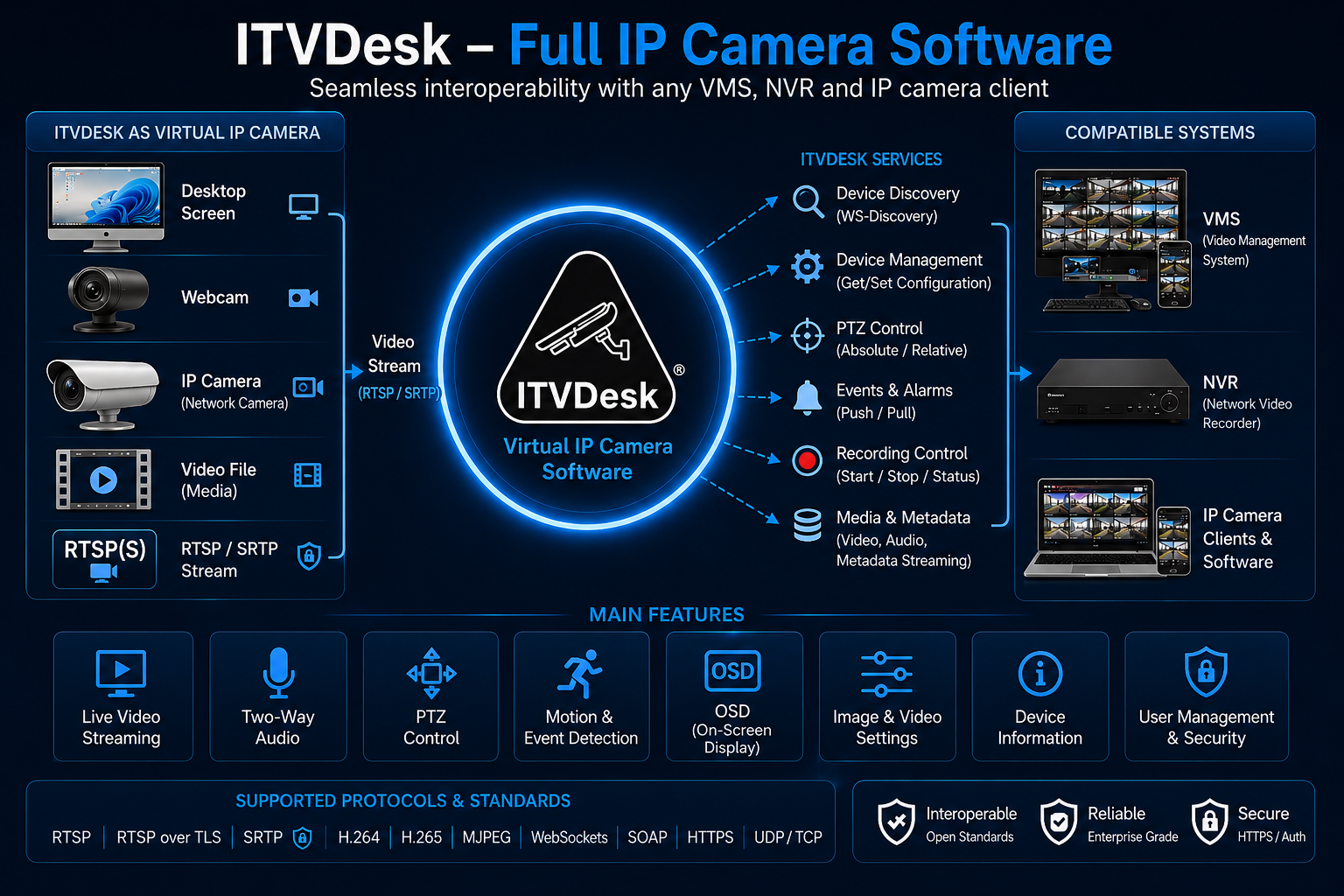
ITVDesk provides extensive ONVIF support, enabling seamless integration with leading VMS and NVR systems. Designed for enterprise environments, it supports a wide range of ONVIF services, commands, and streaming capabilities.

Key ONVIF Capabilities

  • ONVIF Profile S / T / G compatibility
  • Full Media and Media2 service support
  • Two-way audio (Audio Backchannel)
  • PTZ control (including desktop interaction)
  • Event handling and metadata streaming
  • Edge recording and playback support
  • Secure communication (HTTPS, WS-Security)

Supported ONVIF Services

ServiceDescription
Device Device management, network configuration, system settings
Media / Media2 Video/audio streaming, profiles, encoding, snapshot
Events Event notifications, motion detection, alarms
PTZ Pan, tilt, zoom control and presets
Imaging Image settings, focus, exposure, and camera parameters
Analytics Rules, motion detection, metadata
Recording Edge recording, track management
Replay / Search Playback and search of recorded data
Device IO Relay outputs and digital inputs

Streaming & Media Capabilities

Video

H.264, H.265 (HEVC), MJPEG

Audio

G.711, G.726, AAC

Streaming

RTSP, RTP (UDP/TCP), Multicast

Snapshot

Snapshot URI support

Security & Authentication

ITVDesk supports WS-Security with UsernameToken and Digest authentication methods, ensuring secure communication between devices and VMS systems.

Full ONVIF Command Support

ITVDesk implements a wide range of ONVIF commands across multiple services. For full technical documentation and command-level support details, please contact us or refer to detailed integration documentation.

Technology Partners

Our Technology Partners deliver advanced technologies that extend the capabilities of ITVDesk and enable seamless integration with leading VMS, NVR, and video analytics platforms.

ITVDesk is designed for diverse surveillance environments where integration, flexibility, and performance are essential. Through collaboration with our partners, we continuously expand compatibility across a wide range of systems, devices, and applications.

This approach enables system integrators and end users to deploy tailored solutions that meet specific operational requirements — from standard video surveillance to advanced use cases such as desktop streaming, application monitoring, and other non-traditional video sources.

Become a Technology Partner

Join the ITVDesk Technology Partner Program and integrate your solution with our platform.

Apply for Partnership