
ITVDesk – Virtual ONVIF IP Camera Software
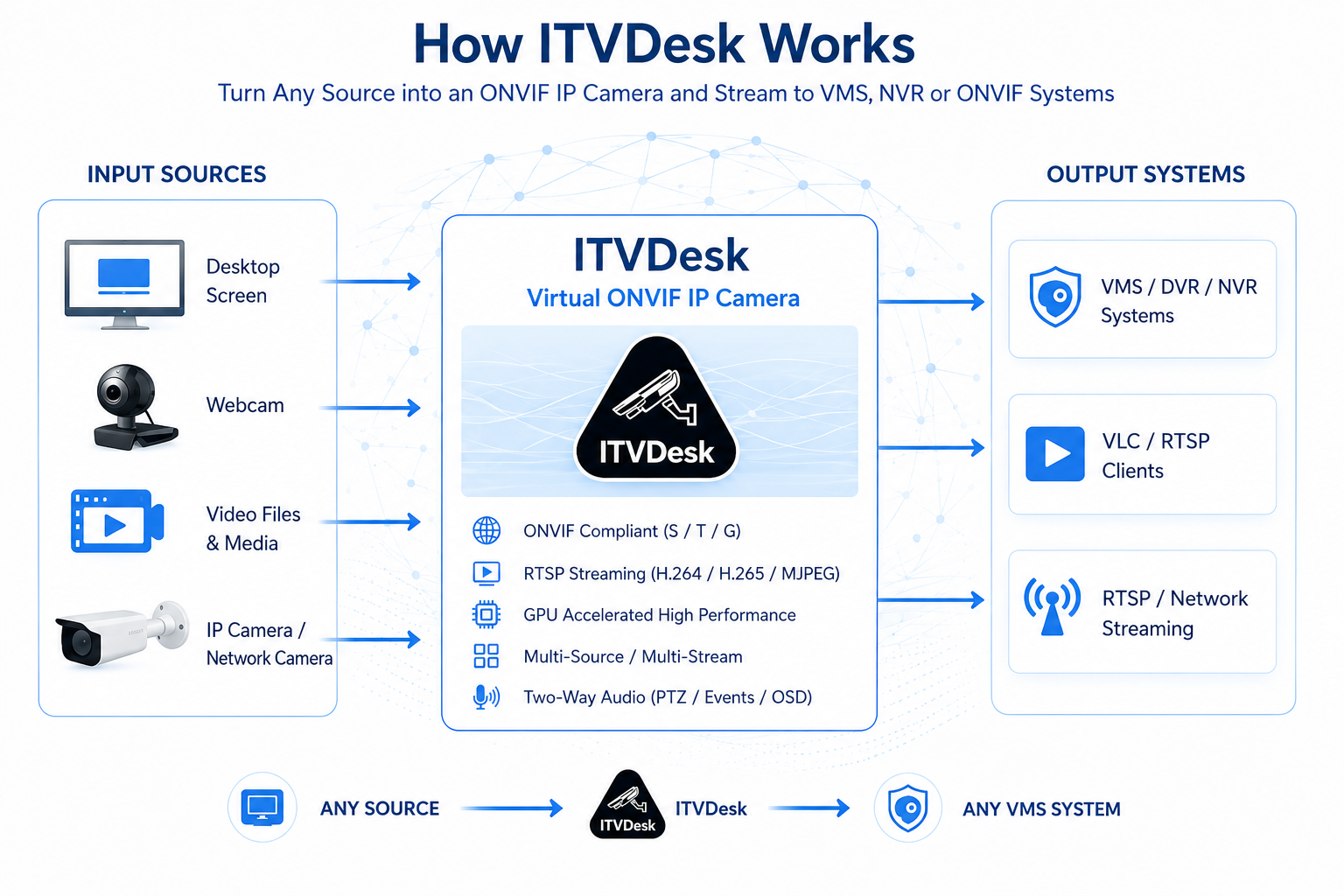
ITVDesk transforms any computer into a fully compliant ONVIF IP camera. It allows real-time streaming of desktop, webcams, audio, files, and external IP cameras directly into VMS and NVR systems.
Ideal for remote monitoring, IT security, workstation surveillance, and integration of non-standard video sources into professional video surveillance environments.
Overview
Core Features
- Camera protocol: ONVIF, Profile S, T, G, M ready *
- RTSP / RTP / SRTP / RTSPS streaming
- H.265 (HEVC), H.264, MJPEG video encoding
- Hardware & Software Processing (GPU-accelerated encoding/decoding with CPU fallback)
- Two-way audio (Audio Back Channel)
- PTZ desktop control (mouse + keyboard interaction)
- Motion detection (keyboard + mouse activity)
- Alarm IN / OUT integration
- Multi-stream support (Main, Sub, Custom)
- Auto discovery (WS-Discovery)
- Secure communication (HTTPS, SRTP, SHA-256)
Media Sources
- Desktop streaming (multi-monitor support)
- Windows application streaming (capture and stream specific application windows)
- Webcam streaming (multiple devices, HDMI, iPhone camera...)
- Audio-only streaming (system sound and microphone)
- Video file streaming (*.mp4, *.flv and other formats)
- Combined streams (merge multiple sources into a single output channel)
- External IP cameras (RTSP, RTMP, HTTP MJPEG)
- External ONVIF devices (convert to virtual ONVIF camera)
- RTSP pusher streams (FFmpeg and external encoder integration)
- Audio-video mixing (combine any audio with any video source)
Total supported sources: up to 256 (16 devices × 16 channels)
Multi-Channel and Multi-Camera Architecture
Multi-channel mode:
One ONVIF device with multiple video channels. Example: 2 monitors + 3 webcams = 5 channels in one device.
Multi-camera mode:
Each source becomes a separate ONVIF camera (different ports). Example: 3 sources = 3 IP cameras (ports 7000, 7001, 7002).
Video and Audio Processing
- Hardware accelerated encoding (GPU support)
- Automatic transcoding, transmuxing, transrating
- Video filters (blur, sharp, grayscale, deinterlace)
- Flexible resolution and bitrate control
- Audio formats: G.711, AAC, G.726, OPUS, G.722
- Video rotation (Auto, Flip, 90°, 180°)
OSD (On Screen Display)
- Keystroke overlay (keyboard capture in video)
- Time and date display
- Channel name display
- Custom text overlay
- Flexible positioning (corners)
Motion Detection and Alarm System
- Mouse movement detection
- Keyboard activity detection
- Configurable detection duration
- Alarm IN (panic button)
- Alarm OUT actions:
- Run application
- Shutdown / reboot
- Lock system
RTSP Streaming Configuration
Example RTSP stream:
Example with parameters:
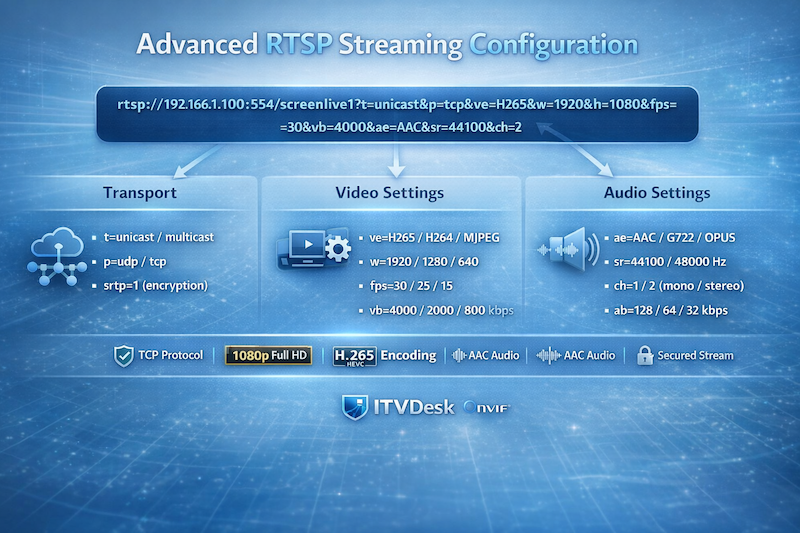
Example: 1080p H.265 stream, 30 FPS, 4000 kbps, AAC audio, secure transmission over TCP.
Multiple streams:
ipc1-stream2 → SubStream
ipc1-stream3 → ThirdStream
Multiple sources:
screenlive1 → Monitor 2
videodevice0 → Webcam
Advanced RTSP Parameters
&p=udp / tcp
&ve=H265 / H264 / MJPEG / MP4
&w=width
&h=height
&fps=frames per second
&vb=video bitrate (kbps)
&ae=audio codec
&sr=sample rate
&ch=audio channels
&ab=audio bitrate (kbps)
&srtp=0 / 1 (enable encryption)
Configure video, audio, transport, and security parameters directly through the RTSP URL to dynamically control stream quality and performance without restarting the server.
Device Management
- Manage streams directly from VMS/NVR
- Change IP, DNS, Gateway
- User management (Admin / Operator / User)
- Relay control (Alarm OUT)
- Video profiles (Main, Sub, Custom)
- Bitrate, FPS, GOP, session control
Supported Services
- Device Discovery (WS-Discovery)
- Device Management
- Media Service (v1 + v2)
- PTZ Service
- Event Service
- Imaging Service
- Analytics Service
- Recording Control (Profile G)
- Recording Search
- Replay Service
- Device IO
Security
- HTTPS / RTSPS
- SRTP encryption
- WS-UsernameToken authentication
- SHA-256 / MD5 digest
- AES data protection
Additional Features
- PTZ Desktop Control (control mouse and interact with desktop via VMS)
- Keystroke Overlay (display keyboard input directly on video stream)
- Hidden background mode
- Auto start with system
- Password protection
- Prevent sleep mode
- Offline installation support
- Advanced streaming diagnostics
Compatibility
- Hikvision
- Dahua
- Milestone XProtect
- Network Optix (Nx Witness)
- Any ONVIF-compatible system
Turn Any Computer into a Virtual ONVIF IP Camera
Stream desktop screens, applications, webcams, and audio directly into VMS/NVR systems using ONVIF and RTSP protocols.
Software-only solution. No hardware required. Fast deployment with a free trial available.